Personal Workspace

Your daily workspace for mail, bills, music, and tmux.

Nucleus unifies Gmail, clipboard intelligence, markdown notes, password vault, monthly bills, Apple Music, embedded tmux, and Funky alerts across multiple Google accounts — with a Dashboard that greets you, analyses your clipboard day, surfaces breaking news, and summarizes what needs attention before you dive in.

Seven workspacesDashboard intelligenceApple Music & tmuxBills & passwordsCloud sync
Nucleus app icon

Native macOS app

Open one cockpit every morning.

Nucleus keeps mail, bills, clipboard, notes, passwords, music, and tmux in one SwiftUI workspace — with a Dashboard that analyses your day and tells you what needs attention first.

Seven workspaces

One sidebar for everything you open every day.

Nucleus is organized around native workspace panes — not buried settings menus. Drag sidebar items to match your routine; Settings and Accounts stay fixed at the bottom.

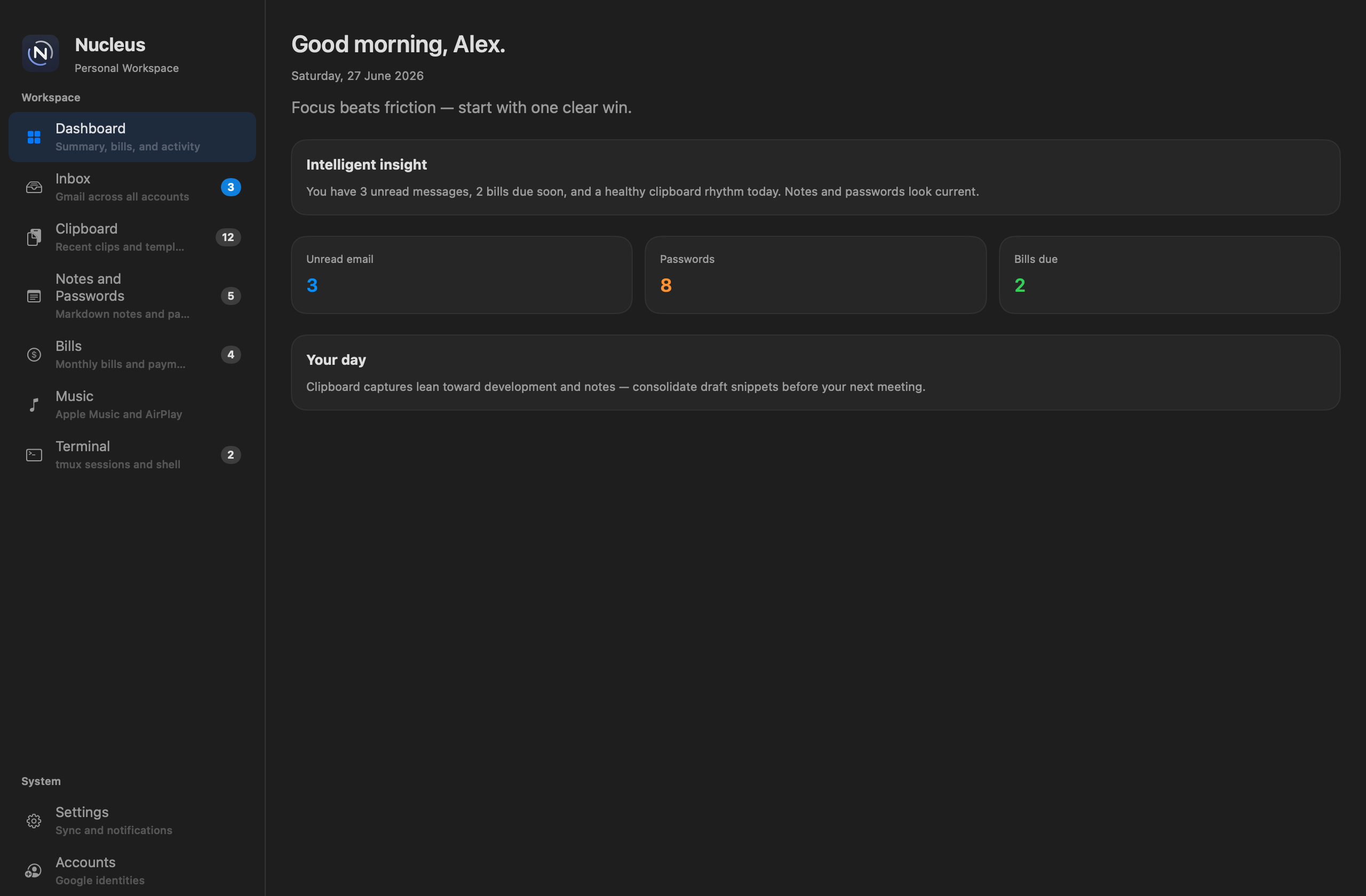
Nucleus Dashboard with greeting, intelligent insight, summary metrics, and Your day analysis

Morning command center

Dashboard

Start every day with a greeting, daily quote, and a read on what needs attention — unread mail, bills, passwords, clipboard patterns, weather, news, and payment prep on one screen.

  • Your day analyses clipboard captures into productivity insights every 30 minutes
  • Intelligent insight weaves inbox, vault, bills, and clips into plain-language status
  • Seven-day productivity chart, summary metrics, and toggles for every section
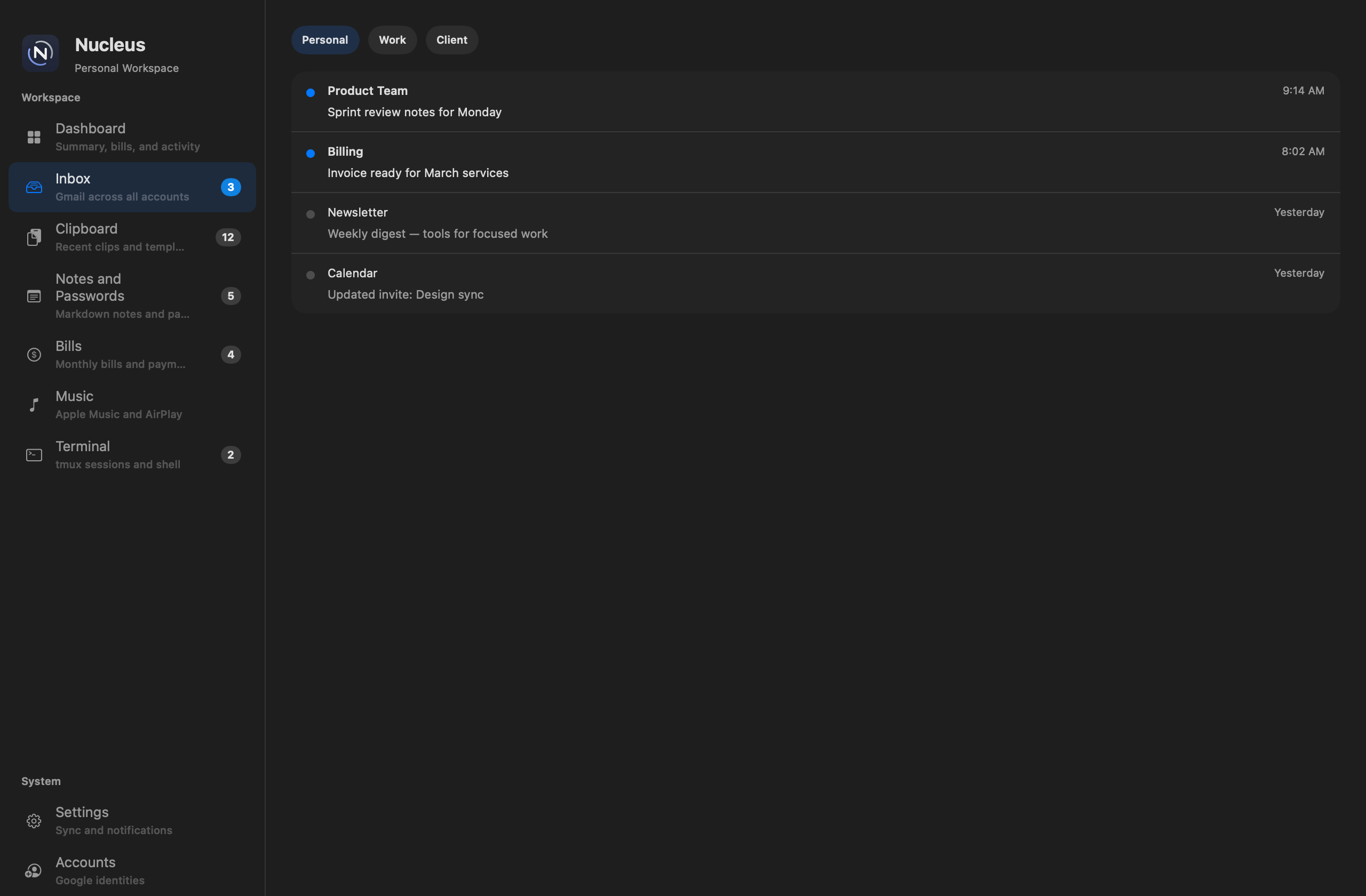
Nucleus Inbox with Personal, Work, and Client account tabs

Multi-account Gmail

Inbox

Category tabs for Personal, Work, Client, and more — each Google account gets an isolated web session so personal, work, and school inboxes stay separate.

  • Unread badges on sidebar, toolbar, account tabs, and the macOS dock
  • Per-message notifications with sender, account, and subject
  • Direct inbox loading when already signed in; external links open in your browser
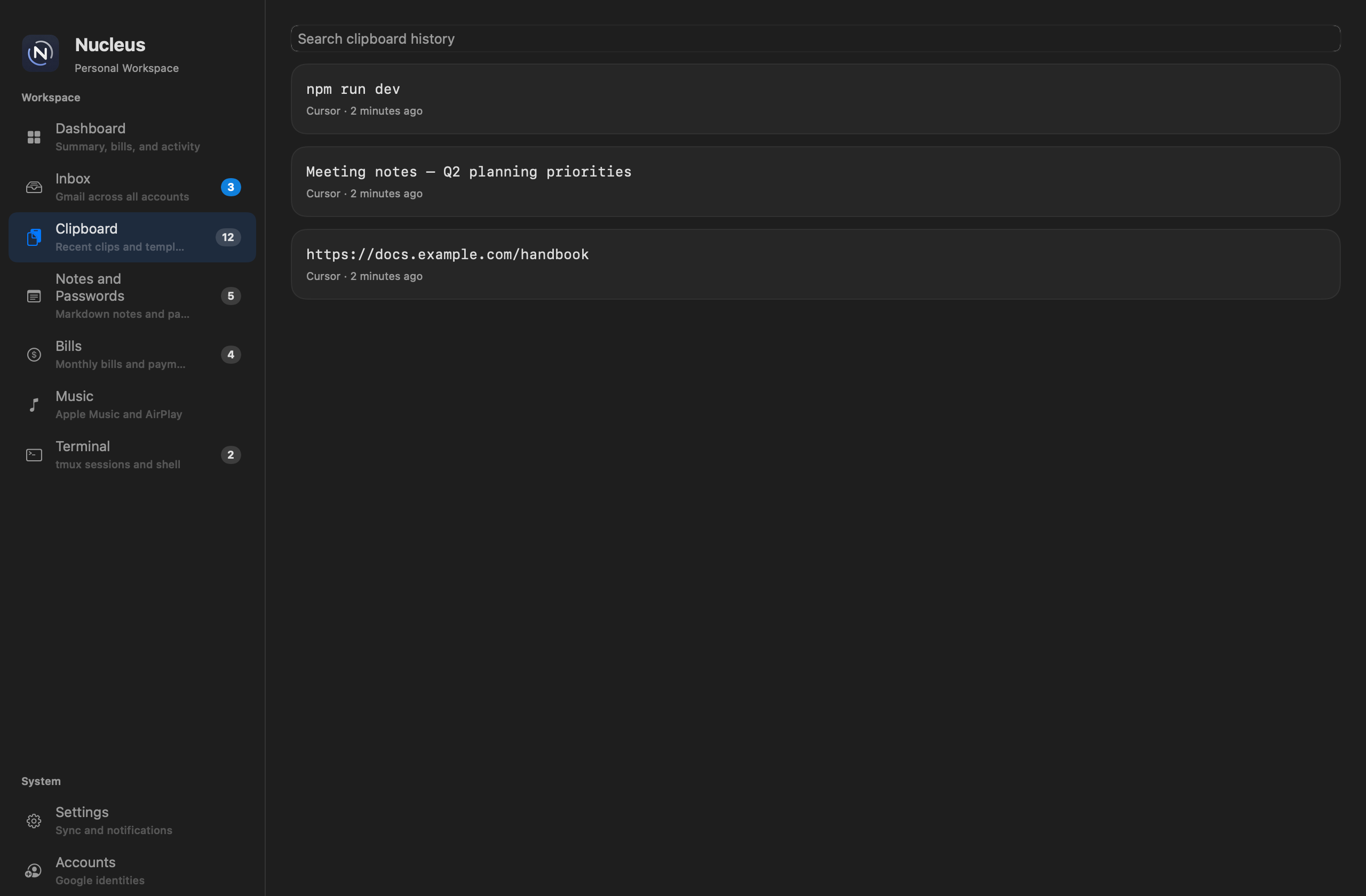
Nucleus Clipboard history with search and recent captures

Capture memory

Clipboard

Automatic clipboard history with search, pinning, and quick paste — without leaving the app you are working in.

  • Paste from history with ⌘⇧V; global Carbon hotkey works from Cursor and other apps
  • Password-like content triggers a save-to-vault prompt
  • Save clips to Markdown notes and feed Dashboard productivity analysis
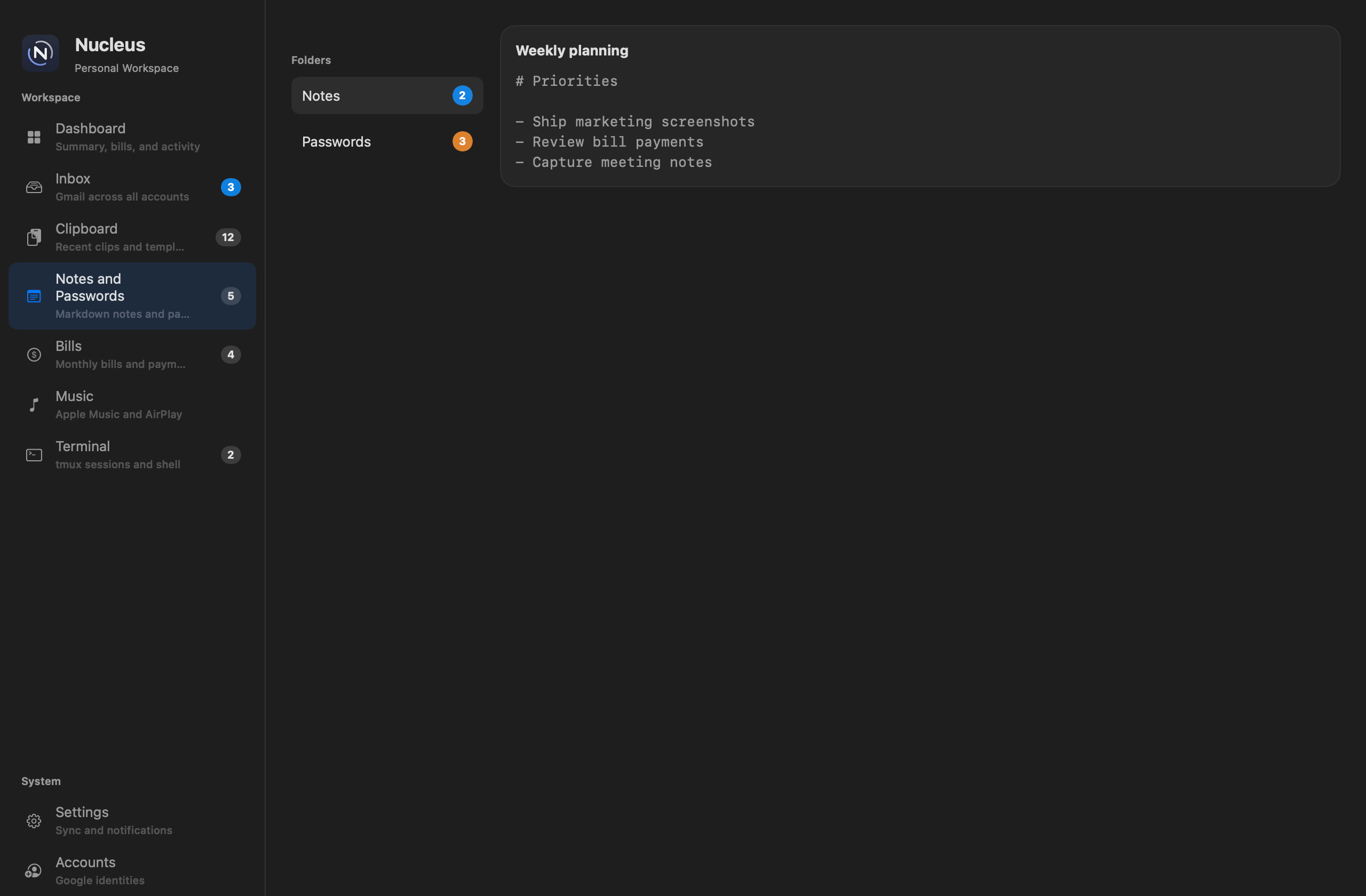
Nucleus Notes and password vault with folders and markdown editor

Knowledge vault

Notes & passwords

Markdown notes for meeting logs and daily capture, plus a structured password vault with username, email, URL, and password fields.

  • Auto-save as you type with Edit / Preview modes
  • Optional Google Drive upload on your primary account
  • Folder counts, context-menu moves, and quick copy from the menu bar popover
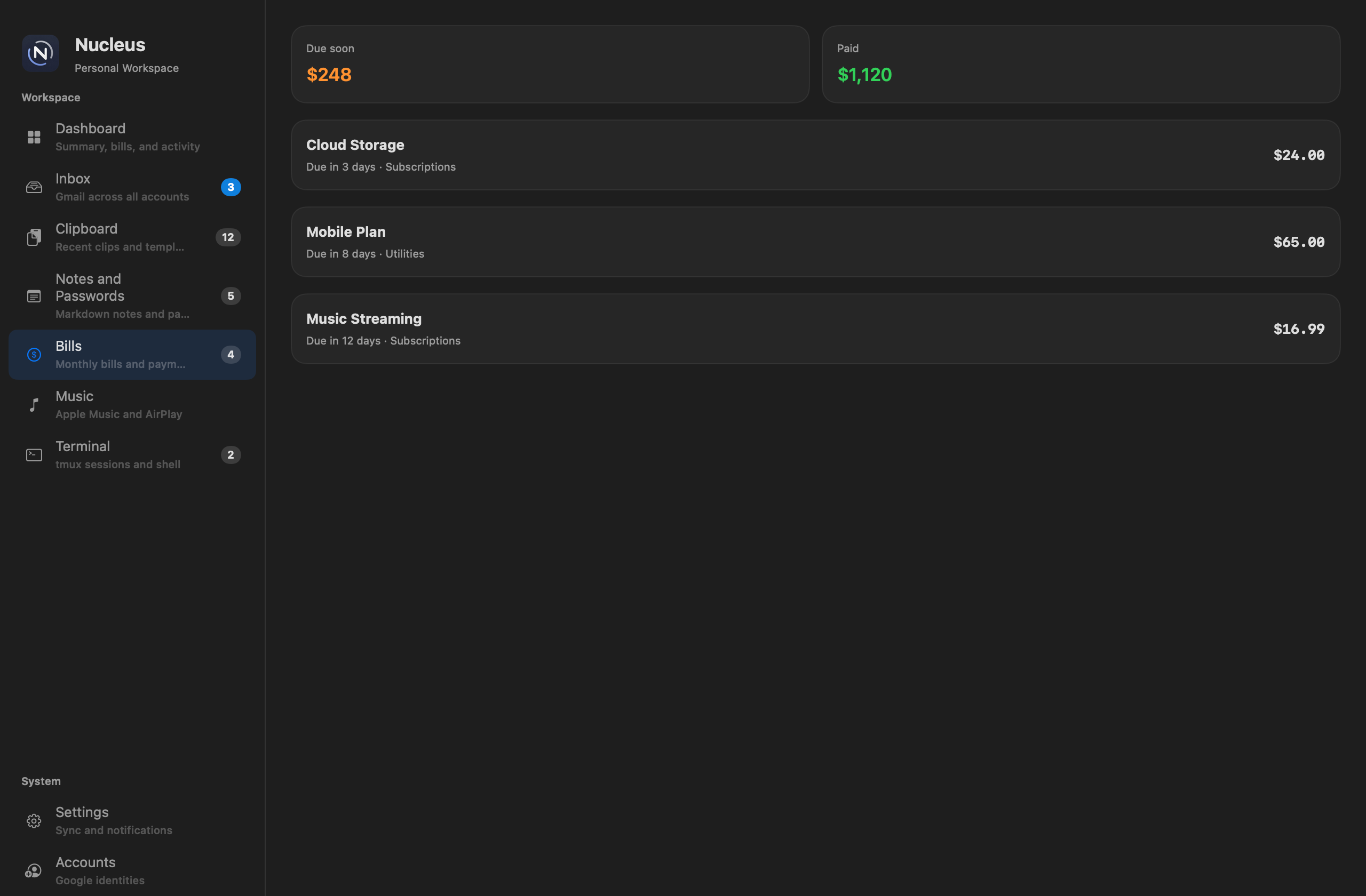
Nucleus Bills workspace with due-soon totals and recurring bill rows

Monthly cash flow

Bills

Track recurring bills in multiple currencies, log full or partial payments, and see what is still due this month.

  • CSV import and export; local reminders before due dates
  • Monthly summary with calendar dots, due-soon totals, and OK to spend
  • Payment preparation on the Dashboard groups upcoming bills by category
Nucleus Music workspace with Apple Music search and synced lyrics

Apple Music & AirPlay

Music

Search Apple Music, play tracks from the catalog, view synced karaoke lyrics, and control playback from the header mini player or Now Playing panel.

  • MusicKit catalog streaming; Music.app library control with Automation permission
  • LRCLib lyric search and synced karaoke lyrics while a track plays
  • AirPlay routing, local audio files, queue playback, and a Playing badge in the sidebar
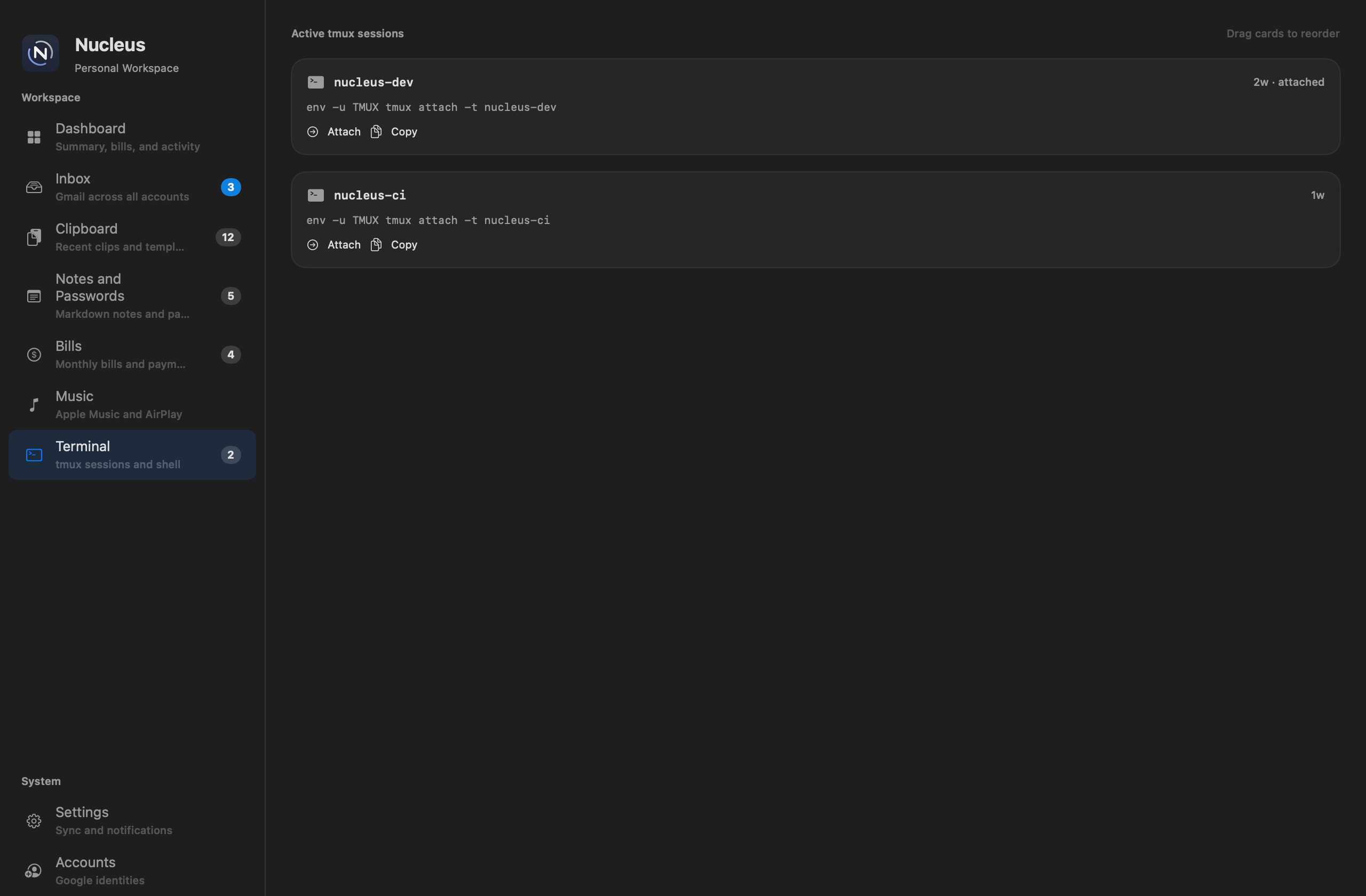
Nucleus Terminal workspace with draggable tmux session cards

tmux inside Nucleus

Terminal

Browse active tmux sessions, attach interactively inside an embedded terminal, and detach without losing running work.

  • Draggable session cards with attach, copy-command, and destroy actions
  • New tmux or shell sessions; scrollback history with trackpad scroll
  • Detach with F12 or ⌘⇧D; sidebar badge shows active session count

Nucleus Dashboard

More than a summary — a read on how you work.

The Dashboard greets you with a daily quote, then layers intelligent workspace insight with clipboard-powered productivity analysis. It learns from what you copy throughout the day — not to store secrets, but to reveal patterns: where your attention goes, which apps you bounce between, and what is still sitting unfinished in your clipboard queue.

Clipboard productivity analysis

Your day

Every 30 minutes, Nucleus reviews today's clipboard captures and turns them into a personal productivity brief — category breakdown, a plain-language summary, data-driven insights, and concrete suggestions to improve how you work.

  • See capture counts by category: notes & drafts, admin & text, communication, development, and more
  • Productivity insights surface dominant work modes, top source apps, context-switching patterns, and capture pace
  • Suggestions to improve recommend focused blocks — consolidate draft snippets, batch terminal commands, or process shared links in one pass
  • Apple Intelligence enhances the narrative on macOS 26+; a rule-based engine keeps analysis useful everywhere

Workspace status at a glance

Intelligent insight

A dated narrative that weaves together unread mail, saved passwords, upcoming bills, and clipboard trends — so you know what needs attention before opening a single tab.

  • Collapsible sections keep the dashboard scannable when you only need a quick read
  • Manual Analyse Now with automatic refresh every 30 minutes
  • Tuned for direct, second-person language — no markdown noise or vague advice

Seven-day clipboard trends

Productivity chart

A bar chart breaks the last week of clipboard activity into Development, Communication, Research, Notes & drafts, Admin & text, and Data & numbers — making it easy to spot where your attention actually goes.

  • Compare categories day by day to see shifts in focus
  • Pairs with Your day analysis for both long-range patterns and today's behavior

Context without clutter

Everything else on one screen

Weather, live CPU and memory for Nucleus, Nucleus Cloud and iCloud sync status, the next public holiday, a scrolling news feed, breaking news banners, optional Nucleus AI and Apple Music panels, summary metrics, and payment preparation — all configurable from Settings → Dashboard.

  • Jump straight into mail, passwords, or bills from summary tiles
  • Payment preparation groups bills due in the next two weeks by category and currency
  • Incoming mail overlay and breaking news alerts appear without leaving your current workspace
  • Toggle any section on or off to match how you start your day

Platform features across every workspace

Beyond the seven sidebar panes, Nucleus layers sync, alerts, AI, news, and macOS-native polish so the app stays useful whether you are in mail, music, or a tmux session.

☁️

Nucleus Cloud & iCloud sync

Sync notes, bills, dashboard analysis, and settings through Nucleus Cloud. iCloud CloudKit keeps notes and bills on your Apple devices — with manual sync and status on the Dashboard.

🔔

Smart notifications

Per-message email alerts with sender and subject, bill due reminders, breaking news banners, and clipboard password prompts — with per-account Funky, Nucleus Mail, or system sounds.

🚨

Breaking news alerts

Urgent headlines slide in as a macOS-style top banner from any workspace — with Open story, auto-dismiss, and mood-aware news cards on the Dashboard.

📬

Incoming mail overlays

New mail while you are on Dashboard, Notes, Music, or Terminal shows the same modal overlay — preview the sender and jump to Inbox without losing your place.

🤖

Nucleus AI

Optional Dashboard panel for AI-assisted answers — collapsible with settings toggles, slow auto-scroll for long responses, and IPv4 fallback when local DNS misbehaves.

📰

News feed

Headlines from your location and holiday countries, with mood-aware color coding, plain-language In brief summaries, and short notes on why each story feels urgent, concerning, or positive.

📎

Menu bar companion

Optional menu bar item for recent clips and passwords, password-save prompts, and clipboard access without bringing the main window forward.

↕️

Reorderable sidebar

Drag workspace items to match your daily flow — like DiskWise. Compact sidebar mode saves horizontal space; badges show unread mail, bills, notes, tmux sessions, and now playing.

🪟

Window layout memory

Nucleus remembers window size, position, and which monitor you used — including external displays — across relaunch and app switches.

🔒

Isolated Google sessions

Each Gmail account gets its own WKWebView cookie jar on your Mac. Web sessions stay local; external links open in your default browser.

⬆️

Sparkle auto-updates

Signed and notarized releases with in-app Check for Updates. What's New appears after each upgrade with highlights from the release notes.

🍎

Native macOS polish

SwiftUI shell with dock badges, hourly beep, refreshed Nucleus app icon, five-minute idle return to Dashboard (except Notes, Music, and Terminal), and Accessibility-aware clipboard hotkeys.

Open source

Nucleus is built in Swift with modular kits for mail, clipboard, notes, bills, and sync. Contributions and issue reports are welcome on GitHub.

github.com/iman-suherman/nucleus

Ready to open one workspace every morning?

Download Nucleus for macOS and open one Dashboard for Gmail, bills, clipboard, notes, passwords, Apple Music, tmux, and alerts — with Your day productivity analysis, breaking news, Nucleus AI, and sync through Nucleus Cloud or iCloud.

Get Nucleus